PDF Scanner

PDF Scanner App
for iPhone.

ScanLens is a free PDF scanner app for iPhone and iPad. It uses the rear camera to capture documents, detects page edges, exports a multi-page PDF, and runs on-device OCR in 50+ languages. No account, no cloud upload. Works offline.

Scan to PDF Searchable Compressible Password-protected
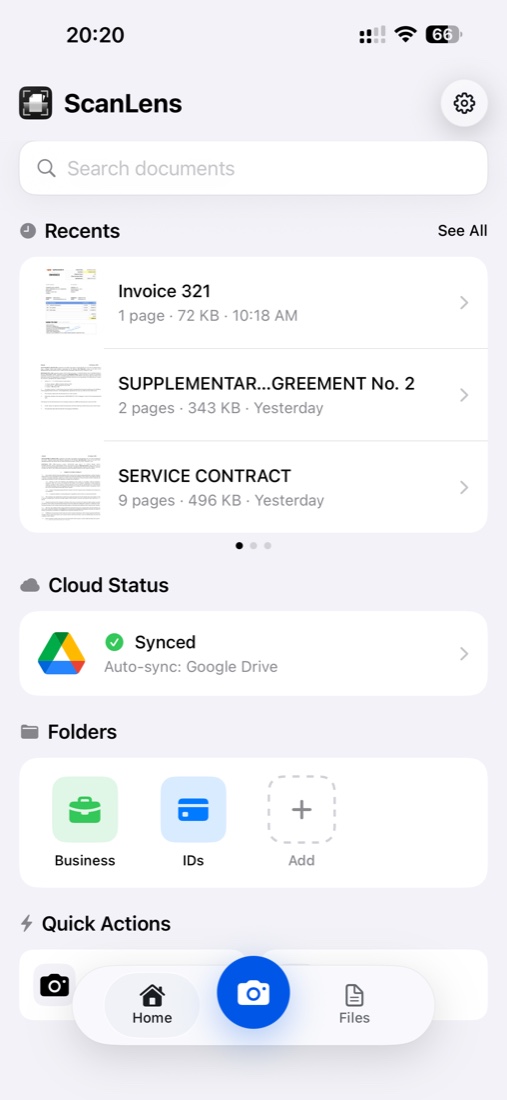
The ScanLens home screen on iPhone with recently scanned documents ready to save as PDF
Built for PDFs

A PDF is not a photo. Don't treat it like one.

Most camera apps save a picture of your document. A real PDF scanner produces a document — multi-page, compressed, searchable, and ready for the workflow it's about to enter. Three things separate the two.

  1. 01

    A page, not a snapshot

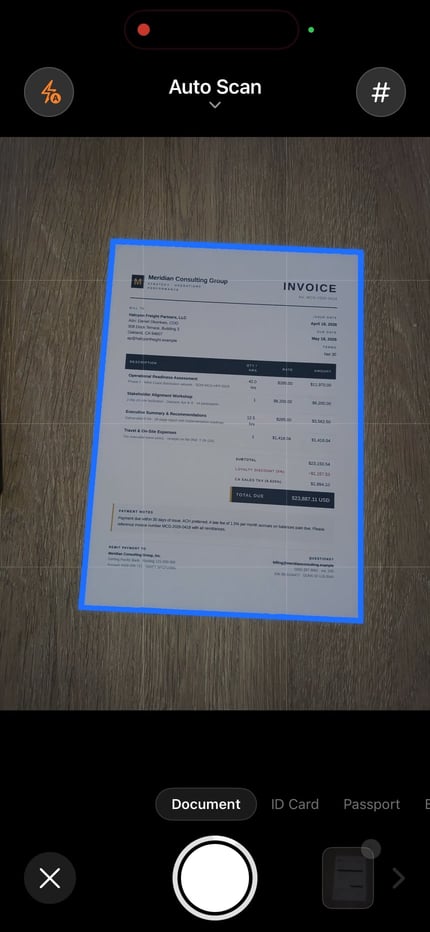
    Edges detected, perspective straightened, shadows removed. Each scan looks like it came off a flatbed, not out of your pocket. Contracts read like contracts again.

  2. 02

    A PDF, not an album

    Ten pages of a lease agreement belong in one file, not ten photos in your camera roll. ScanLens batches pages, reorders them, and wraps them as a single multi-page PDF.

  3. 03

    A searchable document, not an image

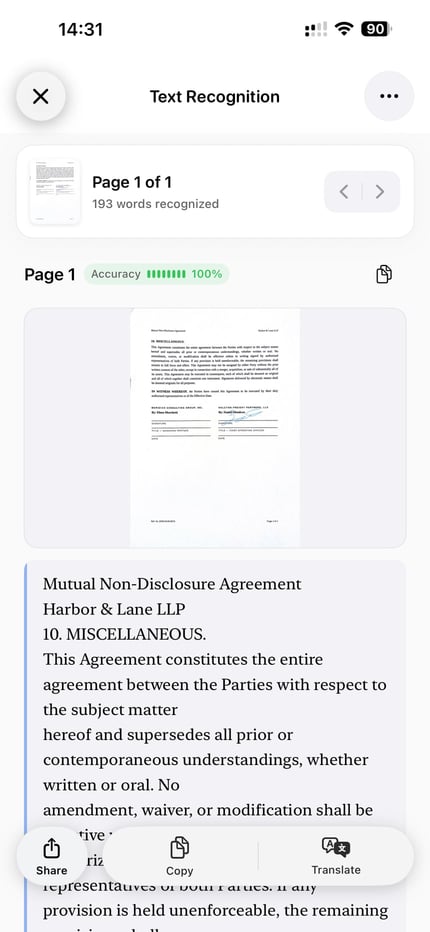
    On-device OCR drops an invisible text layer behind every page. Cmd-F in any PDF reader finds the clause you need. Copy-paste works. The scan behaves like text.

PDF Quality

Tune the file — from archive-grade to email-ready.

Every scan is different. Legal archives need every pixel. A receipt for Slack needs to fit under 500 KB. ScanLens gives you control over the quality-to-size tradeoff with three presets — or a custom slider when you need it.

Maximum

Archive-grade

Minimal compression. Every watermark, stamp, and margin note stays pixel-perfect. Ideal for contracts, deeds, and legal PDFs that need to survive a decade.

Balanced

Everyday quality

Smart per-page compression. Text stays crisp; images drop 40–60% without visible loss. The default for 95% of scans.

Minimum

Email-sized

Aggressive optimisation for tiny files. A 20-page report fits in an email attachment without splitting or zipping.

Searchable output

Find any word in any scan.

ScanLens layers an invisible OCR text layer behind every scanned page. The PDF still looks like the original — the page image, the stamps, the coffee ring — but the text behaves like text. Ctrl-F, select, copy, paste. It just works.

On-device OCR runs in 50+ languages, including Chinese, Japanese, Korean, Arabic, and Hebrew. For multi-language pages, ScanLens detects and processes each script independently, so one scan can contain three languages and all of them stay searchable.

Learn more on our dedicated searchable PDF guide or the OCR app page if you need just the text extraction without the PDF wrapper.

Long-term archives

Export as PDF/A when you need a file to outlive you.

PDF/A is the ISO-standard flavour of PDF built for permanent preservation. Fonts, colour profiles, and metadata are embedded inside the file — so the document renders identically in 2026, 2036, and 2050, on any reader, any OS.

When to reach for PDF/A:

  • Legal contracts and agreements that may be referenced years after signing
  • Tax records, financial statements, audit documents
  • Medical records and patient documentation
  • Academic theses, research publications, citation archives
  • Historical documents and personal archives
Security

Two layers of privacy — without a cloud in sight.

AES-256

Password-protected PDFs

Lock a PDF the same way banks lock yours — AES-256 encryption. Set separate passwords for opening versus editing or printing. One tap, two keys.

Local

On-device processing

Scanning, OCR, compression, signing — every step runs on your iPhone's Neural Engine. Documents never touch a ScanLens server, because there is no server.

Zero

No ads, no tracking

No analytics SDKs collecting scan metadata. No ad networks watching what you capture. The app does its job and gets out of the way.

Export

Send the PDF anywhere you already work.

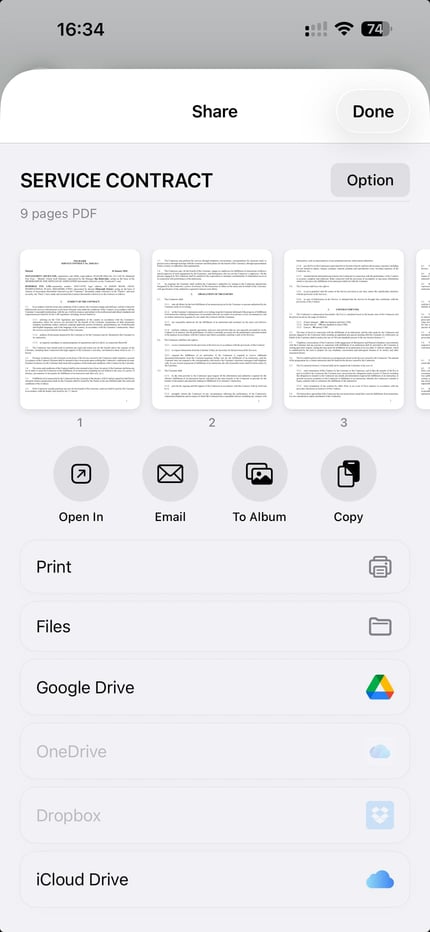
ScanLens plugs into iOS's share sheet and every cloud drive you already use. One PDF, seven destinations, zero copy-paste.

PDF iCloud Drive Google Drive Dropbox OneDrive Mail AirDrop Files Print

Everything — scanning, compression, signing, export — stays inside a single app. No jumping across four tools to produce one signed and archived PDF.

What does a PDF scanner app on iPhone actually do?

A PDF scanner app on iPhone does four jobs the stock camera cannot. It detects the four corners of a document inside the live viewfinder and ignores the table, hand, or carpet around it. It applies perspective correction so a page captured at an angle ends up as a flat rectangle, not a trapezoid. It assembles multiple page images into a single multi-page PDF in capture order, with batch mode for long documents. And it runs on-device OCR through Apple's Vision framework to add an invisible text layer behind every page, so the resulting PDF is searchable in Preview, Files, or any standard PDF reader. ScanLens does all four locally — no upload, no account, no network call.

Built-in iPhone scanner (Notes, Files) vs a dedicated PDF scanner app

The iPhone already ships with a basic scanner. In the Notes app, the camera button reveals a Scan Documents option; in the Files app, the same flow lives under the three-dot menu in the top-right. Both use the same underlying capture engine, both produce a multi-page PDF, and both are free. For a one-off scan of a single receipt that you'll forward in Mail right away, they are enough.

A dedicated PDF scanner app earns its place when the file leaves the iPhone in something other than a fresh email. Notes and Files give you a PDF, but they do not give you on-device OCR with a searchable text layer, named files instead of "Scanned Document.pdf", per-page reordering after capture, page-level compression presets, PDF/A archival export, password protection at the file level, or a saved signature you can drop on the last page. They also bury the result inside Notes' note hierarchy or Files' folder structure — neither shows the scan as a first-class document with its own thumbnail and metadata.

The honest split: Notes/Files for casual one-offs, a standalone scanner like ScanLens when the scan needs to be searchable, named, signed, compressed, or archived. Both options keep processing on the device — no cloud upload either way.

How to scan a document to PDF, step by step

End-to-end, a five-page document is captured, cleaned, OCR'd, and shared in about a minute. Six steps, no app switching.

Step Action Tips
1 Open ScanLens and tap the camera Lay the page on a contrasting surface — dark table, light page, or vice versa — for cleaner edge detection
2 Hold steady until the auto-capture fires Or tap the shutter for manual. Batch mode keeps the camera open between pages — useful for contracts
3 Confirm the detected edges Drag the four corners if the auto-detect missed; ScanLens straightens the perspective once you confirm
4 Pick a colour profile and reorder pages Black-and-white for receipts, colour for IDs and photos, grayscale for contracts. Drag thumbnails to reorder
5 Choose compression and OCR language Balanced is the default; pick Maximum for archives. OCR auto-detects, but you can force a script for mixed pages
6 Export as PDF and share Standard PDF for email, PDF/A for archives, password-protected PDF for confidential files. iOS share sheet handles delivery

What people scan to PDF on iPhone

Business documents and contracts

Signed agreements, NDAs, vendor invoices, purchase orders, and meeting handouts that arrive on paper and need to live in a project folder. Batch mode captures a twenty-page contract in one session; OCR makes every clause searchable so Cmd-F finds the indemnification paragraph six months later. Grayscale compression keeps the file small enough to attach to email without splitting. For workflows that move between desk and field, the business document scanner guide goes deeper on naming conventions and folder structures.

Receipts and expense reports

Receipts curl, fade, and disappear from wallets. Scan them the moment you get them, file them into a Receipts folder in iCloud Drive, and let OCR pick up the date, total, and merchant for later search. Minimum compression keeps a month of receipts under 5 MB — small enough to attach to a single expense-report email. For pages that need to be merged before submission, the PDF editing guide covers reorder, rotate, and combine.

Tax records and financial statements

1099s, W-2s, bank statements, mortgage docs, and the paper trail behind every Schedule C deduction. PDF/A export is the right choice here — the format is built for ISO-standard long-term preservation, so a tax archive from 2026 still opens correctly in 2036. AES-256 password protection layers on top when the file leaves the device. Pair with the searchable PDF workflow so the entire tax folder is grep-able when an auditor asks for a specific transaction.

IDs, passports, and travel documents

Passport bio page, driver's licence, insurance card, vaccination certificate, hotel booking confirmation. Scan once, keep a password-protected PDF in a Travel folder, share a copy with a partner or family member by AirDrop. On-device processing matters most here — government ID images should never sit unencrypted on a third-party server. After capture, drop a signature on a notarised copy with the PDF signing flow.

FAQ

Questions, answered.

What PDF formats does ScanLens support?

Standard PDF for day-to-day work, plus PDF/A for long-term archival. You choose the format at export — the same scan can produce either output without re-scanning.

Can I create searchable PDFs?

Yes. On-device OCR adds an invisible text layer behind every page image, so the PDF stays visually identical to the scan while becoming fully searchable in any reader.

How does PDF compression work in ScanLens?

Three presets — Maximum (archive-grade), Balanced (default), Minimum (email-sized) — plus a custom slider. The engine applies different compression to text regions and photo regions within the same page, so you get small files without blurry text.

Can I password-protect PDFs?

Yes. AES-256 password protection, set at export. You can require one password to open the document and a separate, stronger password to allow editing or printing.

What's the maximum number of pages in one PDF?

ScanLens handles long-form capture — lengthy contracts and multi-page reports — with batch mode and auto-capture. Up to 100 pages per document.

Does ScanLens work without an internet connection?

Yes. Every step — capture, edge detection, perspective correction, OCR, compression, export — runs on the iPhone's Neural Engine. The app needs no network connection, no account, and no sign-in. Documents never leave the device unless you share them yourself.

How many languages does the OCR support?

Over 50, including Latin-script languages, Cyrillic, Greek, Chinese (Simplified and Traditional), Japanese, Korean, Arabic, Hebrew, Thai, and Vietnamese. Multi-language pages are detected automatically — a single scan can contain three scripts and all of them stay searchable. The recognition runs through Apple's Vision framework on-device.

Can I edit a PDF after scanning?

Yes, within the scope of a flat-PDF tool. Reorder pages, delete pages, rotate, add new pages from a fresh scan, drop a signature, annotate, and re-export. For deeper edits — typing into form fields, redacting sensitive lines — see the PDF editing and PDF signing workflows.

Keep exploring

Related guides.

Start scanning

Your PDF scanner. Right in your pocket.

Free to download. Capture, clean, compress, sign, share — one app, every step of the PDF workflow.